


The Weather Channel
The Weather Channel
97.1 MB
16.24.0
9

Premium Unlocked
Description
The Weather Channel APK brings local forecasts, rain radar, and weather alerts together on Android. It is useful for people planning outdoor activities, checking conditions before heading out, or keeping an eye on approaching storms. Alongside hourly and daily forecasts, the app includes air quality information, allergy tracking, and a home-screen weather widget, giving you several ways to check conditions without relying on a single forecast view.
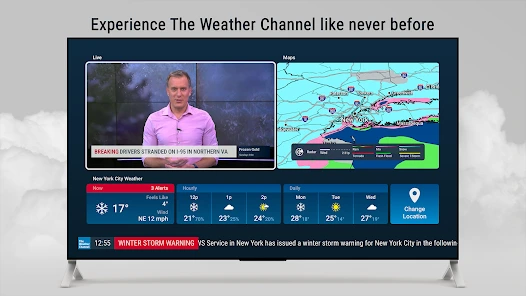
Forecasts for immediate plans and the days ahead
Hourly and daily forecast updates help you compare conditions throughout the day. For longer-range planning, forecasts extend up to 15 days. Use the hourly view when timing an outing matters, and the daily forecast when you want a broader picture of the days ahead.
The Feels Like reading adds context when choosing what to wear. Sunset times and activity forecasts provide other details to consider when arranging time outdoors.
Follow rain and approaching storms on radar
Local rain radar, live Doppler radar, and storm maps let you follow precipitation and approaching weather. Future radar covers the next 24 hours, while an hourly rain tracker offers another way to check expected rainfall.
Severe weather notifications include alerts for rain, snow, and other adverse conditions. Radar maps and alerts serve different purposes: maps show weather patterns, while notifications draw attention to local conditions worth checking.
Air quality, allergies, and home-screen updates
The app includes an air quality index, allergy tracking, and pollen information. These details complement the temperature and rain forecast when you are deciding how to plan outdoor time.
A weather widget brings updates to your home screen, including forecast notifications for the next three hours. Dark mode is also supported. Together, these options make it easier to glance at weather information rather than opening a full radar map for every check.
Installing and checking app permissions
The Weather Channel APK is for Android. Before installing an APK, review the permissions requested and consider whether they fit the features you intend to use. Keep a backup of important device data before making changes to your app setup.
If Android asks you to allow installation from your browser or file manager, enable that permission only when needed. You can turn it off again after installation.
Frequently Asked Questions
How far ahead can I check the forecast?
The app provides forecasts up to 15 days ahead. Its future radar covers the next 24 hours, and hourly forecasts help with nearer-term planning.
Can I see weather updates on my home screen?
Yes. The app includes a weather widget and home-screen forecast notifications for the next three hours.
The Weather Channel APK combines forecasts, radar, and environmental information for everyday planning. Review both the forecast and local alerts when deciding how the weather may affect your plans.
What's new
- Refreshed Radar Map Menu.
- Smarter severe weather alerts.
- Bug fixes.
MOD INFO
- Premium Unlocked
Images


Download links
How to install The Weather Channel?
- Download the The Weather Channel APK from the download section above.
- Open the downloaded APK file and allow installation from unknown sources if required.
- Follow the on-screen instructions to complete the installation.
- Open The Weather Channel and enjoy the app.
Most rated apps
Best Rated Apps






